3. Install HACS
Already have HACS in your Home Assistant sidebar? Skip to 4. Install Audio Control.
HACS is a free "app store" for things the Home Assistant community makes. Audio Control is one of them.
HACS has its own illustrated guide — follow it:
In short, you will:
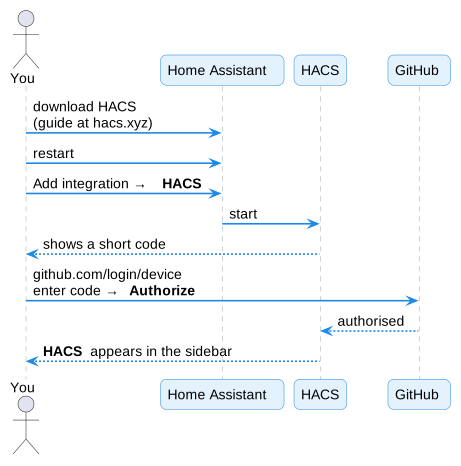
- Download HACS into Home Assistant, the way the guide describes for Home Assistant OS. (Home Assistant calls extras like this Apps — they're under Settings → Apps. Older versions called them add-ons.)
- Restart Home Assistant: Settings → System → ⏻ (top right) → Restart Home Assistant.
- Go to Settings → Devices & services → Add integration, search HACS, and tick the boxes.
- HACS shows a short code. Open github.com/login/device, type in the code, and click Authorize.
HACS now appears in the Home Assistant sidebar.
Is this safe?
HACS only reads public projects from GitHub. Audio Control itself never connects to the internet — it only talks to your amplifier.
Next: 4. Install Audio Control