Protocol Types
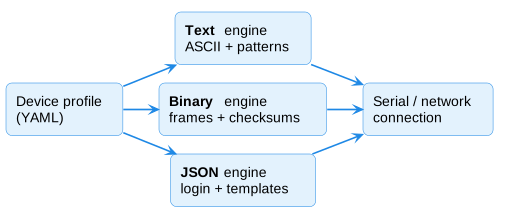
The rs232_protocol library supports three protocol types. The protocol_type field in a YAML profile selects the engine.
Text Protocol (default)
Used by most RS232 audio devices. ASCII commands with string templates.
# protocol_type: text (or omitted — text is the default)
serial:
  command_prefix: "*"
  command_suffix: "\r"
  response_prefix: "#"
  response_terminator: "\r"

commands:
  power_on: "Z{zone:02d}PWR01"

response:
  status_pattern: "ZN(?P<zone>\\d{2}),SRC(?P<source>\\d{2}),VOL-(?P<volume>\\d{2})"
How it works:
- Commands are Python format strings with {placeholder} substitution
- Framing: prefix + body + suffix → encode to ASCII bytes
- Responses: split on response_terminator, strip response_prefix, match against regex patterns
- Regex named groups ((?P<field>...)) are mapped to state via the mapping: section
Devices: AMC, Monoprice, Xantech, Rotel, Yamaha, Marantz, NAD, Oppo, RTI AD-4x, Russound CAV6.6
Binary Protocol
For devices that use hex-framed packets with checksums. Set protocol_type: binary.
protocol_type: binary

binary:
  start_byte: 0x55
  length_includes_start: true
  length_includes_checksum: false
  checksum: mod256          # mod256, xor, rnet, or none
  flow_control: xon_xoff   # xon_xoff or none
  xon_byte: 0x11
  xoff_byte: 0x13

commands:
  power_on:
    opcode: 0xA0
    data: ["{zone}"]        # zone is auto-converted to 0-indexed

response:
  zone_status:
    opcode: 0x20
    fields:
      zone: {offset: 0, transform: add1}
      power: {offset: 2, bit: 1}
      volume: {offset: 7}
How it works:
- Commands build a byte frame: [start] [length] [opcode] [data...] [checksum]
- {zone} and {source} placeholders are automatically converted to 0-indexed (subtract 1)
- Other placeholders ({volume}) pass through as raw byte values
- Literal bytes use hex notation: "0xFF", "0x00"
- Frame extraction uses start byte + length to find complete frames
- Checksum is calculated over frame bytes (excluding checksum byte itself)
- Response parsing uses opcode dispatch + fixed-offset field extraction
Checksum algorithms:
| Name | Formula |
|------|---------|
| mod256 | (0x100 - sum(bytes)) & 0xFF |
| xor | XOR all bytes together |
| rnet | (sum(bytes) + count) & 0x7F |
| none | No checksum |
Response field transforms:
| Transform | Effect |
|-----------|--------|
| add1 | Add 1 (convert 0-indexed to 1-indexed) |
| signed | Interpret as signed byte (>127 = negative) |
| (none) | Raw byte value |
Bit extraction: {offset: 2, bit: 1} reads bit 1 of the byte at offset 2.
Devices: SpeakerCraft MZC-64/66/88, Russound CAS/CAM/MCA (RNET)
JSON Protocol
For devices that communicate via newline-delimited JSON with authentication. Set protocol_type: json.
protocol_type: json

json:
  delimiter: "\n"
  login:
    username: "admin"
    password: "admin"
  status_field: "status"
  success_codes: [200, 901]

commands:
  power_on:
    type: set_powerstate
    value: true
  volume_set:
    type: set_outputvol
    value_template: [{"index": "{zone}", "value": "{volume}"}]

response:
  mappings:
    set_outputvol:
      zone_field: index
      fields:
        volume: value
How it works:
- Commands produce JSON objects: {"type": "...", "value": ...} + delimiter
- value is a literal; value_template supports {placeholder} resolution (recursive in nested objects/arrays)
- Authentication: engine provides format_login() and tracks logged_in state
- Responses are parsed as JSON; status code checked against success_codes
- Unsolicited broadcasts (status 901) are treated as state updates
- response.mappings translate a reply's fields into zone state, keyed by the reply type: zone_field names the zone key inside an array item, and fields maps a state key (volume, source, mute, power, bass, treble, balance, group) to the reply field. Numbers are coerced to int and on/off keys must be JSON booleans. Without a mapping, a reply carries no state the integration can apply
- Frame extraction splits on the delimiter (typically \n)
Devices: RTI AD-46-100, AD-810-100, AD-1616
Creating a New Protocol Type
If you encounter a device that doesn't fit any of the three types, you can extend the library:
- Create
custom_components/audio_control/rs232_protocol/your_engine.py - Inherit from
BaseProtocolEngine(inbase.py) - Implement all abstract methods (see
base.pyfor the contract) - Register in
factory.py'screate_engine()function - Add your
protocol_type: your_typeto the profile YAML
The key methods to implement:
- format_command(name, **kwargs) → str | bytes | None
- frame_to_bytes(command) → bytes
- parse_response(data) → dict | None
- extract_frames(buffer) → (list[bytes], remaining_buffer)
All properties from BaseProtocolEngine (baud_rate, num_zones, volume_max, etc.) must also be implemented.
Integration with AsyncSerialConnection
The connection manager is protocol-agnostic:
from rs232_protocol import create_engine, AsyncSerialConnection

profile = load_profile("my_device.yaml")
engine = create_engine(profile)  # Returns the right engine type

conn = AsyncSerialConnection(port="/dev/ttyUSB0", engine=engine)
await conn.connect()
await conn.send_command("power_on", zone=1)
The read loop calls engine.extract_frames(buffer) on every chunk of data from the serial port. This is what makes the connection protocol-agnostic — each engine knows how to find frame boundaries in a byte stream.